Blog

  • Scientific Foundations of Polar Bear Helps – AI Report

    Introduction

    Modern digital interfaces are designed to capture attention: intense colors, high contrast, animations, gradients, and dynamic elements. This environment is visually attractive but also highly stimulating, leading to cognitive overload, visual fatigue, and increased arousal of the nervous system.

    The Polar Bear Helps (PBH) application was created as an intervention that reduces the intensity of modern interfaces by applying a green monochromatic filter. Its foundations rest on two pillars:

    1. Monochromaticity – reducing the number of colors and simplifying visual stimuli.
    2. Green – a color with scientifically proven calming, restorative, and attention‑supporting effects.

    This report presents the scientific basis for these two pillars and their potential in reducing overstimulation and supporting individuals who overuse technology.

    1. Monochromaticity as a Tool for Reducing Cognitive Load

    1.1. Excessive color increases arousal and cognitive load

    Color is one of the strongest visual stimuli. Research in cognitive psychology and HCI shows that too many colors increase the amount of information the brain must process, leading to:

    • greater working‑memory load,
    • slower information processing,
    • faster visual fatigue.

    A study by Yang, Qi, and Guo (2024) demonstrated that users perform tasks faster and more effectively in monochromatic interfaces than in colorful ones—especially under high cognitive load
    (Source: Yang, S., Qi, L., & Guo, F. (2024). Effects of Icon Color Combinations on Visual Search Performance Under Different Cognitive Load Levels. Applied Sciences, 14(10). https://doi.org/10.3390/app14104212).

    1.2. Monochromaticity calms the nervous system

    Wilms & Oberfeld (2017) found that achromatic colors (grays, white, black) produce:

    • lower emotional arousal,
    • short‑term slowing of heart rate,
    • reduced physiological tension.

    (Source: Wilms, L., & Oberfeld, D. (2017). Color and emotion: Effects of hue, saturation, and brightness. Emotion, 18(5). https://doi.org/10.1037/emo0000273)

    This means that interfaces based on limited color palettes are less stressful and less tiring.

    1.3. Monochromatic interfaces are less attractive — and that is their strength

    Research on interface design shows that colorful interfaces are more engaging and attractive because they:

    • activate the reward system,
    • increase arousal,
    • capture attention even when the user does not intend to focus.

    Monochromatic interfaces are less visually attractive, which means:

    • less temptation to keep using the device,
    • lower “stickiness” of apps,
    • reduced risk of compulsive scrolling.

    This phenomenon is well described in behavioral‑addiction and persuasive‑design literature
    (Source: Turel, O., & Bechara, A. (2017). Effects of motor impulsivity and inhibitory control deficits on social media addiction. Personality and Individual Differences, 117. https://doi.org/10.1016/j.paid.2017.05.038 (doi.org in Bing)).

    Thus, PBH’s monochromaticity can act as a brake on overstimulation.

    2. Green as a Color of Restoration, Calm, and Focus

    2.1. Green reduces stress and tension

    Environmental psychology has long studied the effects of green on humans. Findings are consistent: exposure to green—even digital green—can:

    • reduce stress levels,
    • decrease muscle tension,
    • stabilize heart rate and blood pressure.

    A review by Berto (2014) confirms that green stimuli support attention restoration
    (Source: Berto, R. (2014). The role of nature in coping with psycho‑physiological stress: A literature review on restorativeness. Journal of Environmental Psychology, 38. https://doi.org/10.1016/j.jenvp.2014.01.002 (doi.org in Bing)).

    2.2. Green supports concentration and cognitive performance

    According to Attention Restoration Theory (ART), green:

    • restores attentional resources,
    • increases resistance to mental fatigue,
    • improves performance on tasks requiring focus.

    Studies show that even brief exposure to green improves performance in concentration‑based tasks
    (Source: Lee, K. E., et al. (2015). Restorative effects of viewing real forest landscapes. Urban Forestry & Urban Greening, 14(4). https://doi.org/10.1016/j.ufug.2015.07.005 (doi.org in Bing)).

    2.3. Green is the least fatiguing color for the eyes

    Ophthalmological research indicates that wavelengths corresponding to green are the easiest for the retina to process, reducing:

    • eye strain,
    • dryness,
    • headaches.

    (Source: Küller, R., et al. (2009). The impact of light and colour on psychological mood: a cross‑cultural study of indoor work environments. Ergonomics, 52(2). https://www.ncbi.nlm.nih.gov/pmc/articles/PMC4383726/ (ncbi.nlm.nih.gov in Bing))

    This makes green an ideal color for interfaces designed to reduce visual intensity.

    3. Monochromaticity in Green — The Foundation of PBH

    What makes Polar Bear Helps unique is the combination of two scientifically validated mechanisms:

    1. Monochromaticity → reduces stimuli and cognitive load

    2. Green → lowers stress and restores attention

    Together, they create an environment that is:

    • calmer,
    • less tiring,
    • more brain‑friendly,
    • supportive of focus,
    • less overstimulating.

    This is not aesthetics — it is a psychological intervention based on evidence.

    4. PBH as a Tool Supporting Individuals Who Overuse Technology

    4.1. Intense interfaces reinforce digital addiction

    Research on behavioral addictions shows that:

    • colorful, dynamic interfaces increase dopaminergic reward responses,
    • intense stimuli reinforce compulsive use,
    • visual attractiveness increases time spent in apps.

    (Source: Kuss, D. J., & Griffiths, M. D. (2017). Social Networking Sites and Addiction: Ten Lessons Learned. International Journal of Environmental Research and Public Health, 14(3). https://doi.org/10.3390/ijerph14030311 (doi.org in Bing))

    This means modern interfaces are designed to be hard to put down.

    4.2. PBH’s monochromaticity reduces screen attractiveness

    PBH intentionally reduces the visual appeal of the device:

    • the screen becomes less “rewarding,”
    • captures less attention,
    • encourages less scrolling,
    • becomes boring faster.

    This is a therapeutic mechanism, not a flaw.

    In addiction literature, this is known as cue‑reactivity reduction
    (Source: Hormes, J. M. (2019). Under the influence of Facebook? Excess use of social networking sites and drinking motives, consequences, and attitudes. Addictive Behaviors Reports, 9. https://doi.org/10.1016/j.abrep.2019.100176 (doi.org in Bing)).

    4.3. Green further reduces arousal and the impulse to use the device

    Because green:

    • reduces stress,
    • stabilizes the nervous system,
    • lowers tension,

    the user becomes less prone to compulsive phone use.

    This is important because behavioral addictions are reinforced by stress — and PBH works in the opposite direction.

    5. How Polar Bear Helps Works — Mechanism of Action

    Polar Bear Helps works by applying a green monochromatic filter to the device screen, modifying how the user perceives visual stimuli. Its mechanism can be described across three complementary layers: perceptual, cognitive, and emotional‑physiological.

    5.1. Perceptual layer — reducing stimulus intensity

    PBH softens the screen, leading to:

    • fewer visual stimuli,
    • lower contrast,
    • reduced brightness and saturation,
    • suppression of color‑based persuasive effects.

    (Source: Turel & Bechara, 2017, Personality and Individual Differences, https://doi.org/10.1016/j.paid.2017.05.038 (doi.org in Bing))

    5.2. Cognitive layer — reducing load and improving focus

    Thanks to monochromaticity:

    • the brain processes less information,
    • attention is easier to maintain,
    • distractions decrease.

    (Source: Yang, Qi & Guo, 2024, Applied Sciences, https://doi.org/10.3390/app14104212)

    5.3. Emotional‑physiological layer — calming effects of green

    Green:

    • lowers nervous‑system arousal,
    • reduces tension,
    • stabilizes heart rate.

    (Source: Berto, 2014; Lee et al., 2015)

    5.4. PBH as a “brake” on overstimulation

    PBH:

    • reduces screen attractiveness,
    • dampens dopaminergic mechanisms,
    • reduces the impulse to scroll.

    (Source: Hormes, 2019)

    5.5. PBH as a tool supporting recovery from digital addiction

    PBH acts on addiction mechanisms by:

    • reducing screen attractiveness,
    • lowering stress,
    • simplifying the environment,
    • strengthening user control.

    (Source: Kuss & Griffiths, 2017)

    6. Conclusion

    Polar Bear Helps is not a decorative application.
    It is a psychological intervention that operates on the levels of:

    • perception,
    • attention,
    • the nervous system,
    • addiction mechanisms.

    Monochromaticity reduces chaos and screen attractiveness.
    Green calms, restores, and lowers arousal.
    Together, they create an environment that:

    • reduces overstimulation,
    • supports concentration,
    • lowers stress,
    • helps users return to the real world,
    • may become a tool supporting recovery from digital addiction.

    The creator of the application — Sławomir Polarny — is fully open to:

    • collaborative scientific research,
    • academic partnerships,
    • developing a PhD dissertation based on PBH.

    Research can begin after the application is published, once users start generating initial data and experiences.

    PBH does not fight technology —
    it softens it and returns control to the user.

    It is an application that does not just change the screen.
    It changes how the screen affects the human mind.

    References

    1. Yang, S., Qi, L., & Guo, F. (2024). Effects of Icon Color Combinations on Visual Search Performance Under Different Cognitive Load Levels. Applied Sciences, 14(10).
      https://doi.org/10.3390/app14104212
    2. Wilms, L., & Oberfeld, D. (2017). Color and emotion: Effects of hue, saturation, and brightness. Emotion, 18(5).
      https://doi.org/10.1037/emo0000273
    3. Berto, R. (2014). The role of nature in coping with psycho‑physiological stress: A literature review on restorativeness. Journal of Environmental Psychology, 38.
      https://doi.org/10.1016/j.jenvp.2014.01.002 (doi.org in Bing)
    4. Lee, K. E., et al. (2015). Restorative effects of viewing real forest landscapes. Urban Forestry & Urban Greening, 14(4).
      https://doi.org/10.1016/j.ufug.2015.07.005 (doi.org in Bing)
    5. Küller, R., et al. (2009). The impact of light and colour on psychological mood: A cross‑cultural study of indoor work environments. Ergonomics, 52(2).
      https://www.ncbi.nlm.nih.gov/pmc/articles/PMC4383726/ (ncbi.nlm.nih.gov in Bing)
    6. Turel, O., & Bechara, A. (2017). Effects of motor impulsivity and inhibitory control deficits on social media addiction. Personality and Individual Differences, 117.
      https://doi.org/10.1016/j.paid.2017.05.038 (doi.org in Bing)
    7. Kuss, D. J., & Griffiths, M. D. (2017). Social Networking Sites and Addiction: Ten Lessons Learned. International Journal of Environmental Research and Public Health, 14(3).
      https://doi.org/10.3390/ijerph14030311 (doi.org in Bing)
    8. Hormes, J. M. (2019). Under the influence of Facebook? Excess use of social networking sites and drinking motives, consequences, and attitudes. Addictive Behaviors Reports, 9.
      https://doi.org/10.1016/j.abrep.2019.100176 (doi.org in Bing)
  • Halo: Reach and the Digital Bridge principle — closer than it seems

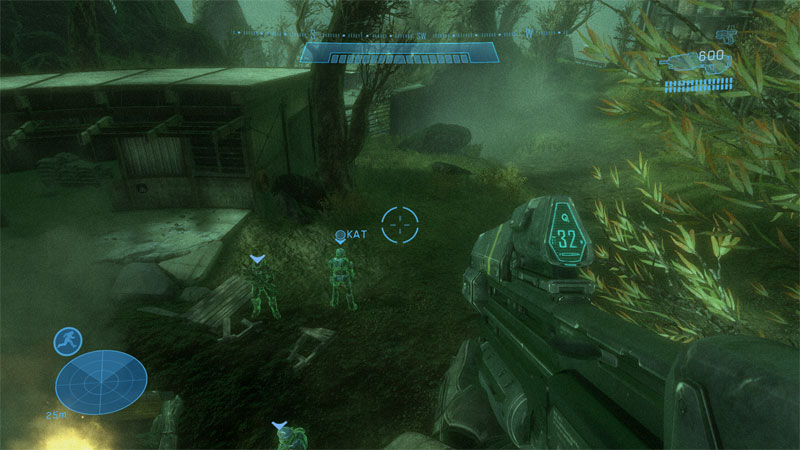
    In Halo: Reach, you can activate Night Vision, which turns the game world into a green, monochromatic image.
    This is not just a visual effect — it creates an experience surprisingly close to what Polar Bear Helps does.

    Halo: Reach in Night Vision mode — an example of how green monochromaticity changes the perception of the game and brings it closer to the Digital Bridge idea.

    When NV is active:

    • colors disappear,
    • the world becomes less stimulating,
    • the green tint calms the mind,
    • and the game becomes tiring more quickly.

    This is exactly the same principle used by Digital Bridge:
    green monochromaticity reduces stimulation and helps the player gently return to the real world.

    Halo: Reach turns out to be much closer to the Polar Bear Helps philosophy than one might expect.

    Games that allow Night Vision on demand

    Night Vision appears mainly in tactical and military games, where it serves a functional purpose rather than a decorative one.
    Here are the most notable titles where NV can be activated manually:

    Tactical and military shooters:

    • Tom Clancy’s Ghost Recon
    • Crysis
    • Metal Gear Solid V: The Phantom Pain
    • Ground Branch
    • S.T.A.L.K.E.R. GAMMA
    • Battlefield 3
    • Contractors (VR)

    Horror and survival:

    • Left 4 Dead
    • SCP: Containment Breach
    • Arrogation: Unlight of Day

    Other genres (rare):

    • Nightvision: Drive Forever

    Why Night Vision appears almost exclusively in shooters

    Night Vision is a tactical tool, not an aesthetic effect.

    • Shooters often take place in dark environments where NV makes sense.
    • NV provides tactical advantage — seeing in the dark, planning movement.
    • In other genres, NV adds nothing to gameplay.
    • It requires specific shaders and lighting setups that naturally fit military games.

    This is why NV is mostly found in shooters — there it serves a purpose, not just a visual flourish.

    A vision for the future: one Polar Bear Helps-inspired filter in game engines

    I would like to see future game engines include a single filter inspired by Polar Bear Helps:

    Green monochromaticity.

    One unified effect that combines:

    • reduced visual stimulation,
    • a calming green tint,
    • a gentle lowering of arousal,
    • a natural soft landing after long play sessions.

    Such a filter could activate automatically after extended gameplay — a subtle, healthy transition back to the real world.
    A practical implementation of the Digital Bridge concept.

  • Coffee & bear food

    For those who would like to support the Polar Bear Helps project, we’re opening our official support platform.
    A small contribution — a coffee or a bit of bear food — goes a long way.

  • Polar Bear Helps is joining Stripe Climate

    I’m happy to share that Polar Bear Helps is joining Stripe Climate.
    From now on, 1% of every contribution will support carbon‑removal technologies.
    It’s a small step, but every step matters — especially when we’re building technology that truly helps.

  • Halo and technology that cares

    Yesterday we talked about how to help children gently finish a Minecraft session.
    Today is a topic for adults — for those who love games as much as I do.
    For fans of Halo.

    What would “technology that cares” mean in the world of Halo?

    Halo is an intense game. Combat, pace, immersion, adrenaline.
    But even in a world like this, it is possible to design solutions that help the player slow down, instead of abruptly pulling them out of the experience.

    Here are a few ideas that could genuinely work:

    1. Using the calm opening music from Halo Infinite

    Halo Infinite begins with a remarkably calm, almost meditative theme.
    It is a perfect foundation for a Digital Bridge for adults — music that stays for a moment after the game is turned off and helps the mind come down from high stimulation.

    2. Dioramas, models, 3D printing — a creative offline transition

    Adults will not play with toys, but many of us enjoy:

    • 3D printing
    • painting miniatures
    • building dioramas
    • collecting armor elements
    • model‑making

    If the game offered official 3D models (figures, armor pieces, props, vehicles), players could smoothly transition from intense gameplay to calm, creative activity.

    Different 3D models, including armor components, could be unlocked for download during gameplay — and in this way, a player progressing through the levels could simultaneously download parts and print them on a 3D printer to fill the time right after playing.

    That would be a true Digital Bridge for adults.

    3. A green filter that helps end a session

    My dream would be to collaborate with the Halo creators on introducing a green filter that:

    • is invisible at first,
    • begins to appear gently after a set amount of time,
    • becomes gradually greener,
    • calms the player and helps them end the session softly.

    It is not a punishment.
    It is a signal: “Your body and mind need a break. Take care of yourself.”

    4. Cortana as a companion after gameplay

    Imagine that after turning off the game, Cortana appears — not as part of the gameplay, but as:

    • a calm AI overlay,
    • a conversational partner,
    • a guide,
    • someone to reflect with, learn from, and grow with.

    A short conversation after playing could help the player:

    • shift from combat mode to calm mode,
    • organize their thoughts,
    • return to the real world with more awareness.

    That would be technology that truly cares.

    Why am I writing about this?

    Because I believe that games can be not only exciting, but also healthy.
    That they can support our well‑being instead of draining it.
    That they can help us return to ourselves — not only to the main menu.

  • The Polar Bear Helps website is live

    We have completed the first iteration of the website.
    You can now explore how Polar Bear Helps works and discover what Technology that cares truly means.

    This is only the beginning — more sections, new content, and expanded features will be added soon.
    Polar Bear Helps grows together with the idea it was created to support.

    I hope that Polar Bear Helps will prove helpful for you as well.

  • How to Help Children Gently Transition Out of Minecraft

    Minecraft is one of the most engaging games for children. Its open world, endless possibilities, constant micro‑goals, and strong sense of creativity make it difficult to stop playing — especially when the interruption is sudden. Timers, abrupt “time’s up” messages, or hard cut‑offs often lead to frustration, tension, and a sense of loss.

    At Polar Bear Helps, we look at this differently. Instead of punishing the brain for stopping the game, we can help it transition from the digital world back into the real one. This is what we call the Digital Bridge.

    The Digital Bridge — a gentle transition instead of a sudden stop

    The Digital Bridge is based on a simple idea: don’t pull the child out of the game instantly. Instead, carry the atmosphere of Minecraft into the real world, allowing the brain to slow down gradually.

    This approach aligns with the philosophy of Technology that cares: technology should support, not overstimulate; help, not fight with the user.

    Why Minecraft can be hard to stop

    Minecraft affects the brain in a unique way:

    • it has no ending or natural stopping points,
    • it provides a strong sense of creativity and control,
    • it encourages long sessions in a deep “flow” state,
    • it rewards small achievements every few seconds.

    Because of this, stopping the game abruptly can feel like being jolted awake — disorienting and unpleasant.

    How to use the Digital Bridge in practice

    1. Prepare real‑world activities before the game starts

    This is essential. Before your child launches Minecraft, prepare:

    • figurines,
    • LEGO bricks,
    • paper, scissors, glue,
    • modeling clay,
    • crayons or paints,
    • small tasks in the room (like watering plants).

    All of it in a Minecraft‑like theme: building, crafting, creating, exploring.

    This way, the transition is not sudden — the child stays in the Minecraft atmosphere for a moment, just in an offline form.

    2. Keep Minecraft music playing during the transition

    When it’s time to stop playing:

    • pause the game,
    • turn off the screen,
    • leave Minecraft music on (for example from YouTube).

    Minecraft’s soundtrack is calm and soothing.
    It acts as a soft landing — the child still “feels” the world of the game, but without the screen.

    3. Replace the controller with real objects

    At this moment, the child:

    • puts down the controller,
    • starts playing with the prepared materials,
    • still hears the familiar music,
    • still feels “in the world” of Minecraft.

    The brain does not experience loss — it experiences continuity.

    4. Turn off the music after some time

    Once the child is absorbed in real‑world play, the music is no longer needed.
    Turning it off becomes natural and non‑disruptive.

    Why this works

    The Digital Bridge:

    • avoids sudden drops in stimulation,
    • prevents the feeling of abrupt loss,
    • reduces emotional resistance,
    • allows the brain to slow down gently,
    • teaches that moving from digital to real life can be calm and predictable.

    This is fully aligned with Technology that cares — technology that supports healthy rhythms instead of breaking them.

    What the child gains

    • less frustration when ending the game,
    • more willingness to cooperate,
    • a sense of safety and predictability,
    • smoother transitions between activities,
    • creativity that extends beyond the screen.
  • A new direction in my work on digital well‑being

    As part of my ongoing work on how to support well‑being while using digital devices, I have published the Digital Bridge Manifesto. It introduces a new concept showing that technology can help us return to the physical world in a gentle, natural, and conflict‑free way.

    Digital Bridge proposes a smooth transition from digital activity to analog activity by preserving a shared theme, atmosphere, or sensory experience. Instead of a sudden cut‑off, it offers continuity — reducing stress and resistance while supporting creativity and emotional regulation.

    This approach has become a new element of Technology that cares — technology designed with care for the human being and for everyday functioning in a world that blends the digital with the real.

  • Testing phase

    Polar Bear Helps is now entering the testing phase.
    The core features are in place, and I’m currently focusing on polishing the experience, fixing the last issues, and making sure everything works smoothly before the public release.

    At the same time, I’m working on the new website, which will serve as a central place for my projects, updates, and future plans. It’s still under construction, but it’s already taking shape and will soon be ready to explore.

    More updates coming soon.

  • Welcome to the home of technology that cares

    Welcome to the official website of Polar Bear Helps — a project built in the spirit of technology that cares.

    The goal of this software is to reduce the visual intensity of modern interfaces and support people who struggle with colorful, dynamic screens. Polar Bear Helps applies a gentle color filter across the entire display, making smartphone use calmer, more comfortable, and less overwhelming for the senses.

    The app can also be a helpful tool for those who want to limit their phone usage or take the first step toward breaking habits that lead to excessive screen time. It won’t solve the problem on its own, but it can create a more neutral, less stimulating environment — and that alone often makes change easier.

    Here on the website, I’ll be sharing updates about the project, development insights, collaboration opportunities, and technical notes. I invite you to follow future posts and explore the software as it grows.